PHP Chatbot Assistant
A free chatbot you run on your own server
Upload your documents, train a bot on them, and paste one line of code into your website. Visitors ask questions, and the bot answers using your documents.
- Free and open source (MIT license)
- You host it, so your data stays with you
- No subscription and no account with us
A Node.js version is available too. It does the same things and looks the same, but it is written in JavaScript. github.com/OnlineTechSupportBiz/js-chatbot-assistant.
- Free, no subscription
- MIT license
- No framework
- PostgreSQL 16 + pgvector
- Bring your own AI provider
- 282 unit tests
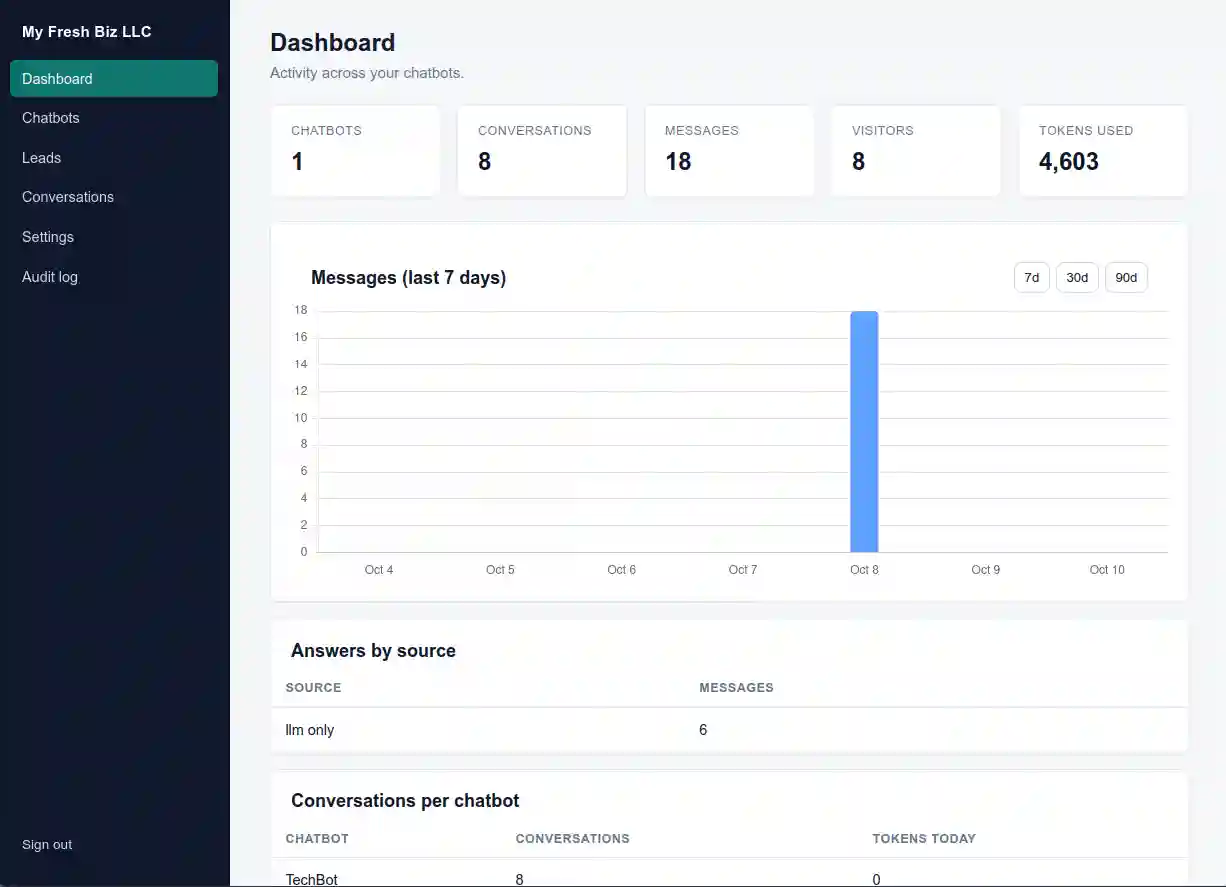
What you get
A complete chatbot product, ready for client work
Download it, set up the database, and add your own AI keys. Everything you need to run chatbots for clients is already built in: a separate space for each client, the training system, the website widget, lead capture, permissions, and a record of what everyone did.
-
As many chatbots as you need
Create, copy and manage as many bots as you want. Each one has its own model settings, its own instructions, its own look, and its own list of websites it is allowed on.
-
Answers from your documents
Upload a PDF, Word file, text file or Markdown file. The system reads it, splits it into pieces and stores those pieces so the bot can find them, and it shows you when each step is done.
-
Use any AI provider
Add models by name, key and web address: OpenAI, OpenRouter, or a model you run yourself. Each bot picks one, and if it stops working the bot automatically tries your backup.
-
Two ways to find answers
Use vector search in pgvector, or use PageIndex, where the AI reads the document's table of contents and jumps straight to the right part. You pick this for each bot.
-
101 prompt presets
Ready-made instructions for 27 industries. Pick one, change it to fit you, or write your own from scratch.
-
AI lead capture
The bot asks for a name, email and phone number right in the chat. There is no popup and no form. Every lead is saved and listed with the conversation it came from.
-
Quick answers
Write replies that send the moment someone types a set word or phrase. The AI never runs, so common questions are free and answered instantly.
-
Sign-in and security, done for you
Passwords hashed with Argon2id, two-factor sign-in with recovery codes, account lockout, a limit on how often one visitor can send messages, form-token (CSRF) protection, and sessions that change on every sign-in.
Finding answers
Two ways to answer from your documents
Most chatbot tools make you pick one way to find answers and live with it. Here you choose for each bot, so you can use each method where it works best.
Vector search
Your documents are cut into small pieces and turned into number patterns called embeddings, which are stored in pgvector with an IVFFlat index. When someone asks a question, the system finds the closest pieces and sends those to the AI.
- Fast, well tested, and its cost is easy to predict
- Best when each answer sits in its own paragraph
- Ready to use as soon as the upload finishes
Reading the outline
The document is turned into a tree of headings and sections. The AI scans the outline, picks the sections that matter, and reads only those, the same way a person uses a table of contents.
- Nothing splits an answer in half
- Great for long, well-organized documents
- Fewer embedding calls, so it costs less
The widget
One script tag, and it is on your site
The embed code is built from your chatbot's own settings. Change the colors, header text, placeholder or position and the code updates while you type.
<script src="https://your-server.com/widget.js"
        data-widget-token="YOUR_WIDGET_TOKEN"
        data-api-base="https://your-server.com"
        data-bot-name="Support"
        data-primary-color="#2563eb"
        data-position="bottom-right"
        data-widget-theme="light"></script>
- Shadow DOM. Your site's CSS cannot break the widget, and the widget cannot break your site.
- Light and dark panels, plus your own main, accent, gradient and header colors.
- Quick-answer buttons loaded when the panel opens, plus a typing indicator.
- Expandable. Drag either edge to make the panel wider or narrower.
- Ratings. If a chat goes quiet, the visitor is asked to give 1 to 5 stars.
- Locked to your sites. The widget only works on the domains you list, so a copied snippet does nothing on someone else's site.
- Markdown answers. Answers can include formatting like bold text and lists. The code that renders them is locked to a fixed version, and the HTML is cleaned against a safe list of tags before it is shown.
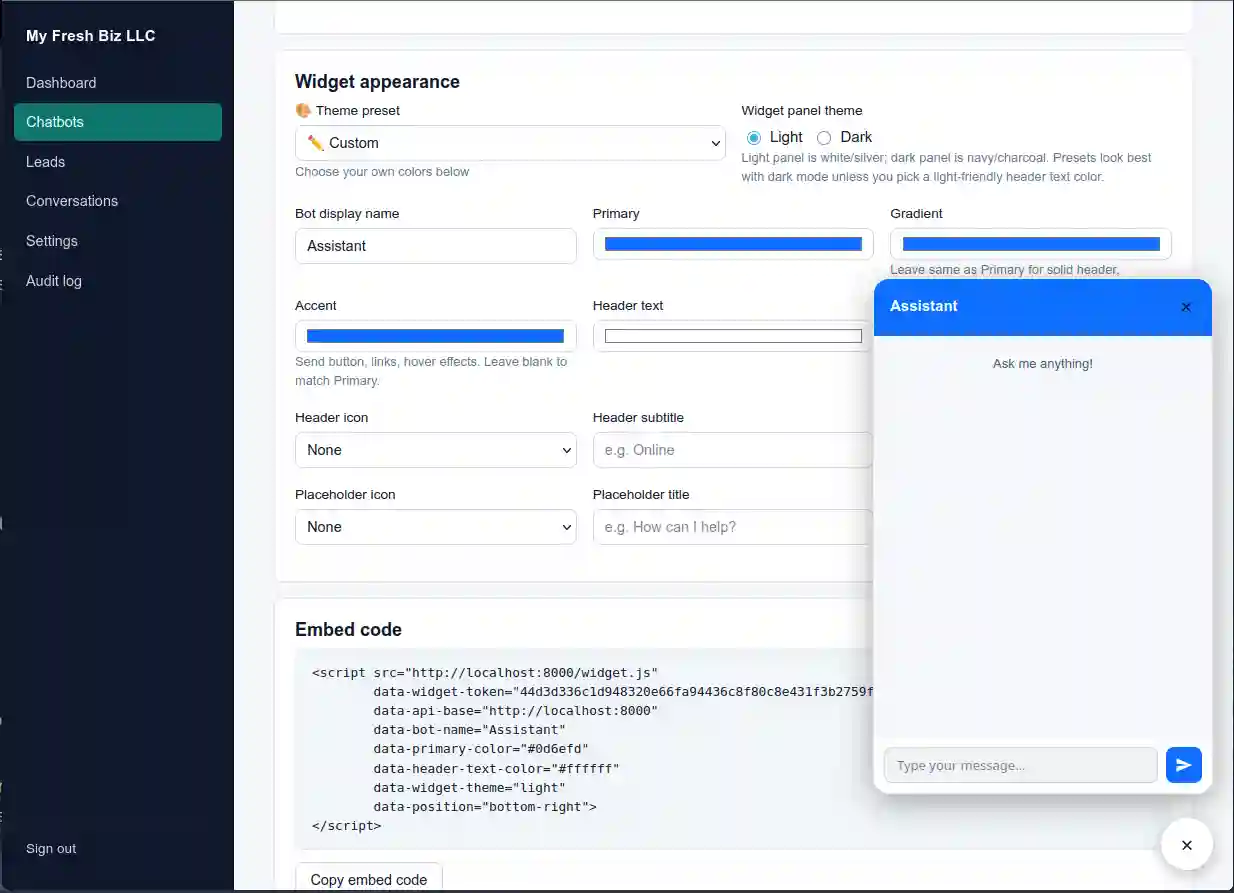
Widget styling with the live preview. Every field shows up in the floating panel and in the embed code below.
Inside the product
Twenty-two screens, from first sign-in to the audit log
Click any screen to open it full size. Use the arrow keys to move through the set, Escape to close.
Dashboard and analytics
1 screenChatbots and results
6 screensTraining, conversations and leads
5 screensAccounts, security and the audit trail
10 screensInstallation
Running on your own server in about half an hour
- PHP 8.2+ with pdo_pgsql and mbstring
- PostgreSQL 16+ with the pgvector extension
- Composer
- An account with your chosen AI provider
- A key for a service that reads PDFs and Word files (for example, LlamaCloud)
-
Clone the repository and install its two dependencies
git clone https://github.com/OnlineTechSupportBiz/php-chatbot-assistant.git
cd php-chatbot-assistant/pca
composer install
Composer and the app live in
pca/. Point your web server's document root at thepublic_html/folder next to it, which holds the main program, the widget and the other files it needs. -
Create the database and its two accounts, then turn on pgvector
sudo -u postgres psql << 'SQL'
CREATE ROLE chatbot_migrator LOGIN PASSWORD 'your-migrator-password';
CREATE ROLE chatbot_user LOGIN PASSWORD 'your-app-password';
CREATE DATABASE chatbot_assistant OWNER chatbot_migrator;
SQL
The migrator account owns the tables. The app account is what the website signs in with. Using two separate accounts is required, because that is what keeps each customer's data away from the others. Then, as a superuser (only a superuser can add the extension), create a schema owned by the migrator and turn on pgvector in it:
sudo -u postgres psql -d chatbot_assistant << 'SQL'
CREATE SCHEMA IF NOT EXISTS chatbot_schema AUTHORIZATION chatbot_migrator;
CREATE EXTENSION IF NOT EXISTS vector WITH SCHEMA chatbot_schema;
SQL
-
Run the database setup and write the settings file
cd migrations
DB_HOST=127.0.0.1 DB_PORT=5432 DB_NAME=chatbot_assistant \
DB_USER=chatbot_user DB_PASS='your-app-password' \
DB_MIGRATOR_USER=chatbot_migrator DB_MIGRATOR_PASS='your-migrator-password' \
PG_SCHEMA=chatbot_schema \
php run.php

cd ..
cp .env.example .env
nano .env        # fill in the DB_*, APP_URL and SMTP values
chmod 600 .env
run.phpwill not start unless the migrator account is different from the app account, and when it finishes it gives the app account the rights it needs. The settings file lives atpca/.env, and every setting you can change is listed in it. -
Start the app, sign up, and add your AI models
Point your web server at
public_html/. Sign up on the site. The first account becomes the admin for that client account. In Settings, add the AI models you want by giving each one a name, an API key and a web address: OpenAI, OpenRouter, or a model you run yourself. Add an embeddings model and a document-reading key there too. -
Create a chatbot and train it
Pick an industry preset (101 of them across 27 categories) or write your own instructions, choose vector search or PageIndex, then upload a document. The system reads the file, splits it up, stores it and makes it searchable, and it shows you the status of every step.
-
Embed the widget and lock it to your domain
Copy the snippet from the chatbot page and paste it into your site right before
</body>. Add the domains allowed to use that widget token, so a copied snippet stops working anywhere else.
Check the security setup
Optional, but worth doing: every table should show t | t (row-level security on and
forced) and be owned by chatbot_migrator, not chatbot_user.
sudo -u postgres psql -d chatbot_assistant -c \
  "SELECT c.relname, c.relrowsecurity, c.relforcerowsecurity, pg_get_userbyid(c.relowner) AS owner
   FROM pg_class c JOIN pg_namespace n ON n.oid = c.relnamespace
   WHERE n.nspname = 'chatbot_schema' AND c.relkind = 'r';"
Verify the install
php vendor/bin/phpunit tests/Unit/
282 tests cover the models, controllers, routes, sign-in, rate limits, prompt-injection detection, both ways of finding answers, and unsafe-HTML cleaning. They use fake databases, so nothing outside your machine is contacted.
Security
Regularly scanned by three independent tools
The code is scanned regularly with three independent tools: static analysis, a simulated live attack, and a scan for outdated packages and leaked secrets. The latest run came back clean:
| Scanner | What it checks | Result |
|---|---|---|
| Semgrep (SAST) | Static code analysis: injection, secrets, unsafe patterns | 0 findings |
| OWASP ZAP (DAST) | Live full scan: XSS, SQL injection, headers, session handling | 0 failures (warnings fixed) |
| Trivy | Dependencies, secrets, misconfigurations | 0 findings |
| PHPUnit | 282 unit tests: sign-in, rate limits, document lookup, HTML cleaning | 281 pass, 1 pre-existing mock issue |
Commands used (from the top folder of the repository):
# Static analysis
semgrep scan --metrics=off --config p/default --config p/php --config p/security-audit --config p/secrets

# Live dynamic scan against a running instance (full scan, report to zap-report.html)
docker run --rm --network host -v "$(pwd)":/zap/wrk:rw -t ghcr.io/zaproxy/zaproxy:stable \
  zap-full-scan.py -t http://example.com:8000 -r zap-report.html

# Dependency, secret and misconfiguration scan
trivy fs --scanners vuln,secret,misconfig --severity HIGH,CRITICAL .

# Unit tests
cd pca && php vendor/bin/phpunit tests/Unit/
Questions
Before you clone it
What does it cost to run?
What models can I use?
Is this a product I have to subscribe to?
Where does my data and my clients' data live?
Can I host several clients on one installation?
I need help processing my documents, can you help?
Should I use traditional RAG or PageIndex?
How do I put the chatbot on a website?
</body> on the site, then add that
site's domain to the chatbot's allowed-domain list. The widget runs in a Shadow DOM, so it
ignores the page's CSS and cannot push its own styles into your page.
Own your chatbot, not a subscription
Your documents, your answers, your server. You own the chatbot outright instead of paying for a subscription forever.
Free · MIT licensed · no subscription · PHP 8.2+ · Node.js port available · PostgreSQL 16 + pgvector